Has anyone noticed that DWA users are leaving behind folder locks, even when they logout properly?
It seems kind of random right now.
SystemAdmin - Wed May 05 09:42:52 EDT 2010 |
|
Re: DOORS Web Access leaving stray locks
kierant - Wed May 05 10:16:27 EDT 2010
Hi Cliff - I raised what I think is the same problem with support about a year back and this is the response I got:
"when a formal module that has in-links is opened, the corresponding Link Module is opened in Read-only mode in the back ground and a shared lock is placed on the project/folder containing the Link Module"
That all sounds strange to me, but it was defended as intended product behaviour. I think you will observe similar behaviour in Doors client itself, but i didn't look into it too much further.
Kieran
|
|
Re: DOORS Web Access leaving stray locks
llandale - Wed May 05 12:46:57 EDT 2010 kierant - Wed May 05 10:16:27 EDT 2010
Hi Cliff - I raised what I think is the same problem with support about a year back and this is the response I got:
"when a formal module that has in-links is opened, the corresponding Link Module is opened in Read-only mode in the back ground and a shared lock is placed on the project/folder containing the Link Module"
That all sounds strange to me, but it was defended as intended product behaviour. I think you will observe similar behaviour in Doors client itself, but i didn't look into it too much further.
Kieran
|
|
Re: DOORS Web Access leaving stray locks
john.young@macb.com - Fri Apr 08 09:58:02 EDT 2011
Has anyone resolved this problem yet? Once someone logs in using DWA, I can no longer Archive Projects even though everyone has logged off due to "open folders" (?) until I reboot the DOORS server.
|
|
Re: DOORS Web Access leaving stray locks
llandale - Fri Apr 08 12:25:51 EDT 2011 john.young@macb.com - Fri Apr 08 09:58:02 EDT 2011
Has anyone resolved this problem yet? Once someone logs in using DWA, I can no longer Archive Projects even though everyone has logged off due to "open folders" (?) until I reboot the DOORS server.
|
|
Re: DOORS Web Access leaving stray locks
SystemAdmin - Wed Jun 08 10:14:07 EDT 2011
I have recently been assisting one of our sister business units who have DOORS v9.2.0.0(required to use exact DOORS version as their customer) running with DWA 1.4.0.2 since early April 2011 thru end of May 2011.
2 weeks ago they got all tangled up due to DWA sessions leaving stray locks behind.
It created a situation where the 1 DWA user license was taken by the user who had the stray locks left and as such, the user could not log back in as it was still holding the DWA license due to the stray locks. In addtion, the 1 float client user was now not able to see several views and data held hostage by the stray lock user issue. At that time they were in panic mode looking for help, I helped them walk thru clearing the stray locks, but they had lost a couple days of work and they are now VERY skeptical about further use of DWA. I checked and DWA v1.4.0.3 and the Fix Lists do not yet include a FIX for the stray locks issue.
Yesterday, I submitted a PMR to get the ball rolling with DOORS support to get a FIX going.
Not sure if anyone else has submitted this to a PMR level, but some of the posts here indicate that this DWA stray locks issue has now been around over a year and really needs to be resolved if DWA is going to become a viable option vs. full pc clients.
I know...I know... DWA v1.4.0.X should be evidence enough that DWA is still in the early stages of maturity & development.
But this business unit suffered the pain of losing time & schedule dealing with this significant bug.
gsdguy
|
|
Re: DOORS Web Access leaving stray locks
cliff.sadler - Tue Jun 28 16:00:08 EDT 2011 SystemAdmin - Wed Jun 08 10:14:07 EDT 2011
I have recently been assisting one of our sister business units who have DOORS v9.2.0.0(required to use exact DOORS version as their customer) running with DWA 1.4.0.2 since early April 2011 thru end of May 2011.
2 weeks ago they got all tangled up due to DWA sessions leaving stray locks behind.
It created a situation where the 1 DWA user license was taken by the user who had the stray locks left and as such, the user could not log back in as it was still holding the DWA license due to the stray locks. In addtion, the 1 float client user was now not able to see several views and data held hostage by the stray lock user issue. At that time they were in panic mode looking for help, I helped them walk thru clearing the stray locks, but they had lost a couple days of work and they are now VERY skeptical about further use of DWA. I checked and DWA v1.4.0.3 and the Fix Lists do not yet include a FIX for the stray locks issue.
Yesterday, I submitted a PMR to get the ball rolling with DOORS support to get a FIX going.
Not sure if anyone else has submitted this to a PMR level, but some of the posts here indicate that this DWA stray locks issue has now been around over a year and really needs to be resolved if DWA is going to become a viable option vs. full pc clients.
I know...I know... DWA v1.4.0.X should be evidence enough that DWA is still in the early stages of maturity & development.
But this business unit suffered the pain of losing time & schedule dealing with this significant bug.
gsdguy
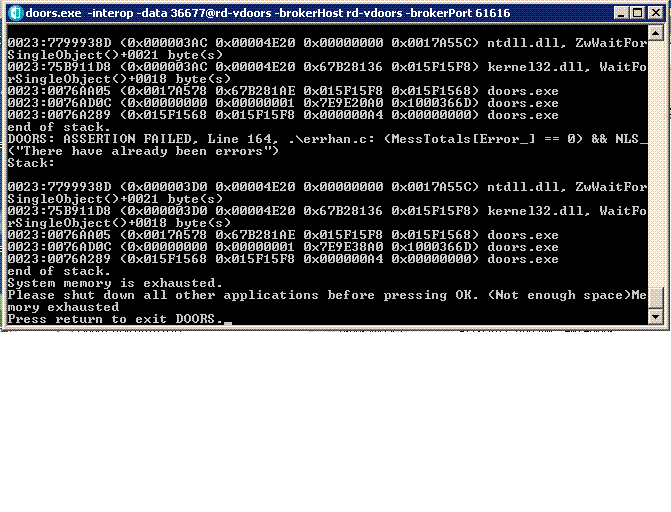
The system is 4GB, Dual Xeon E5504, Win2008 Server x64, VM. what's killing me?
Attachments
attachment_14634562_dwa-crash.gif
|
|
Re: DOORS Web Access leaving stray locks
Cliff Sadler BTI - Thu Feb 19 14:59:53 EST 2015
5 years and a bunch of versions later, and DWA sessions still leave behind locked folders. Should I assume this will never get resolved?
While on the subject, does anyone have an explanation of how DWA is able to lock a single record (object) in a module to write to it, or is it really switching the entire module to exclusive mode for a moment (or 10) when writing a value into an attribute? I see very slow save times when editing a single object attribute, and saving it.
|
|